


- mysql数据库连接报错:is not allowed to conn
- GmSSL-3.1.1编译
- Python副业技术总结,手把手教你用宝塔面板部署Django程序
- 【记录npm镜像设置失效的解决过程】
- 基于SpringBoot+vue的高校学生成绩管理系统
- JavaSpring Boot + POI 给 Word 添加水印
- 虚幻引擎架构自动化及蓝图编辑器高级开发进修班
- Java连接PostGreSql
- Springer Latex投稿(编写中遇到问题及解决方案)
- mysql中find
- 【解决】Spring Boot创建项目常见问题
- 云计算的大数据处理:实时分析与批处理
- 【Spring】SpringBoot整合MybatisPlusGern
- 蓝禾,三七互娱,顺丰,康冠科技,金证科技24春招内推
- 23、Lua 学习笔记之一(初阶话题)
- IntelliJ IDEA 2024.1安装与激活[破解]
- 机器学习入门基础(万字总结)(建议收藏!!!)
- 【数据结构】双向链表详解
- MySQL的启动与连接
- uni-app的页面中使用uni-map-common的地址解析(地址
- 基于大模型的Text2SQL微调的实战教程(二)
- 大数据 DataX-Web 详细安装教程
- Windows 安装 Apache 和 PHP的详细步骤
- 【PHP系统学习】——Laravel框架数据库的连接以及数据库的增删改
- Spring boot高频面试题及答案,面试官看完也得跪!
- VSCode 配置 Spring Boot 项目开发环境
- 图论(算法竞赛、蓝桥杯)--Dijkstra算法最短路
- 金融支付系统中的云计算与边缘计算
- springboot实现黑名单和白名单功能
- Python 操作 json 数据
文章目录
- 若依框架新增自定义主题风格
- 实现结果
- 实现步骤
- 默认主题的设置
- 布局设置
- 图标文件
- 布局组件
- 准备CSS变量
- 对状态管理库中的主题名称进行匹配
- logo图标组件
- 左侧导航栏菜单组件
- 顶部导航栏组件
- 炫彩主题
- 实现结果
- 实现步骤
- 布局设置
- 布局组件
- 其他
- 展示内容的路由出口
- 布局设置-开启topNav后,顶部展示的组件
- 打开页面切换的TagesViews
若依框架新增自定义主题风格
实现结果
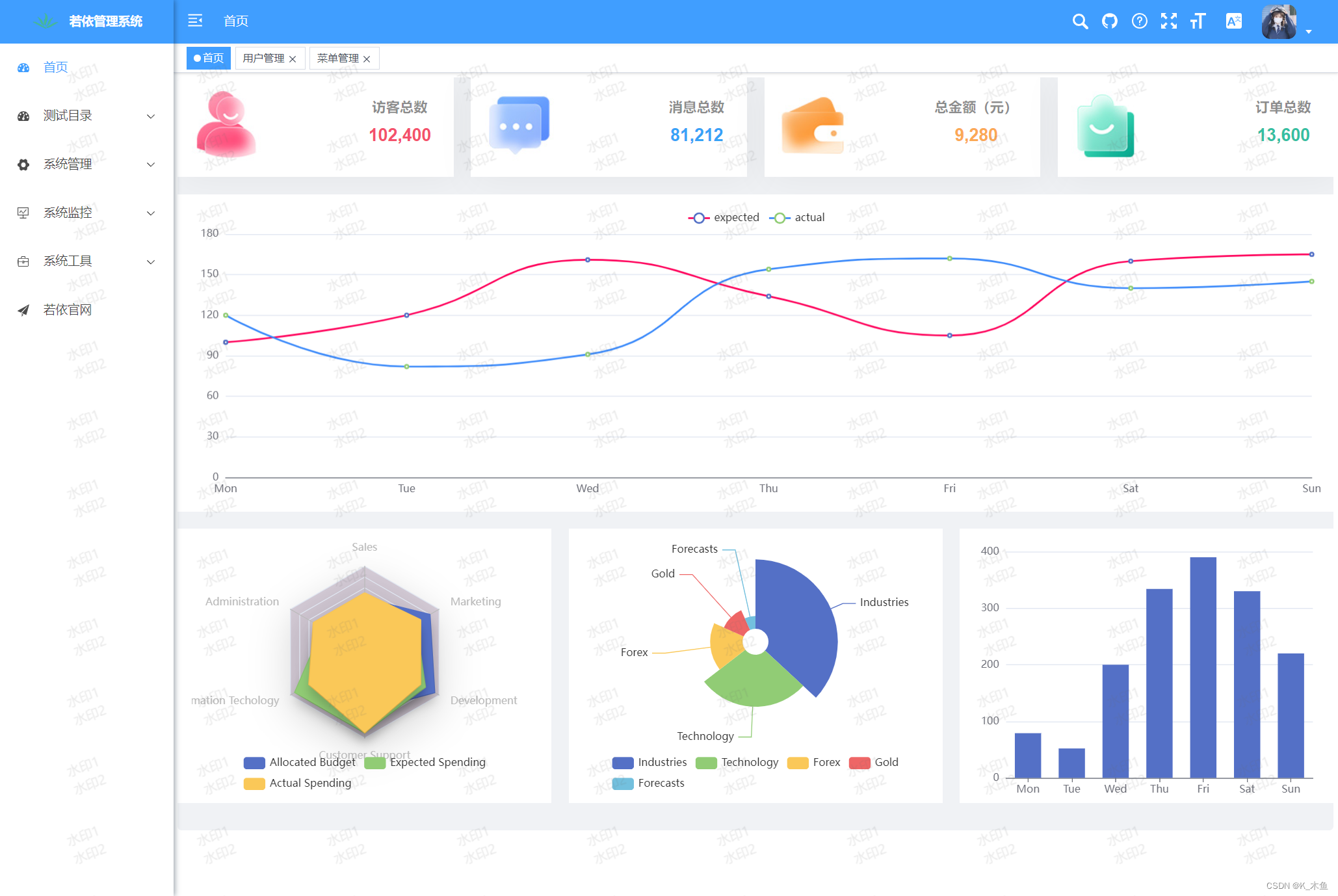
实现步骤
默认主题的设置
文件位置:src/settings.js
export default {
  // ...
  /**
   * 侧边栏主题 深色主题theme-dark,浅色主题theme-light,蓝色主题theme-blue,炫彩主题theme-shine
   */
  sideTheme: 'theme-blue',
  // ...
}
布局设置
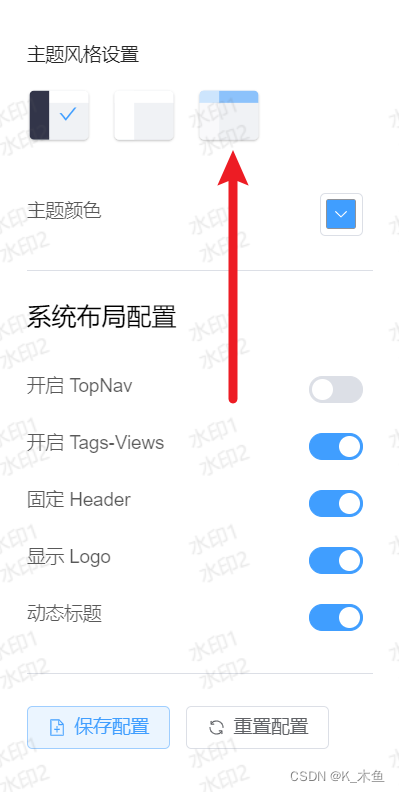
图标文件
文件位置:src/assets/images/blue.svg
复制同级的 light.svg 修改名称即可,将两个颜色替换为:#409eff
布局组件
文件位置:src/layout/components/Settings/index.vue
template模板中添加控件如下
新增一个主题风格选项,主要注意的是handleTheme里面的传参(后面会用到)和img的src图片,例如实例中的blue.svg

准备CSS变量
文件位置:src/assets/styles/variables.module.scss
// 默认菜单主题风格
$base-menu-blue-color: rgba(0, 0, 0, 0.7);
$base-menu-blue-background: #ffffff;
$base-logo-blue-title-color: #ffffff;
$base-menu-shine-color: #ffffff;
$base-menu-shine-background: rgba(0, 0, 0, 0);
$base-logo-shine-title-color: #ffffff;
// ...
// 顶部菜单主题风格
$base-navbar-color: #999093;
$base-navbar-icon-color: #5a5e66;
$base-navbar-background: #ffffff;
$base-navbar-blue-color: #ffffff;
$base-navbar-blue-background: #409eff;
$base-navbar-shine-color: #ffffff;
$base-navbar-shine-background: rgba(0, 0, 0, 0);
// ...
:export {
	menuBlueColor: $base-menu-blue-color;
	menuBlueBackground: $base-menu-blue-background;
	logoBlueTitleColor: $base-logo-blue-title-color;
	menuShineColor: $base-menu-shine-color;
	menuShineBackground: $base-menu-shine-background;
	logoShineTitleColor: $base-logo-shine-title-color;
	navbarColor: $base-navbar-color;
	navbarIconColor: $base-navbar-icon-color;
	navbarBlueColor: $base-navbar-blue-color;
	navbarShineColor: $base-navbar-shine-color;
	navbarBackground: $base-navbar-background;
	navbarBlueBackground: $base-navbar-blue-background;
	navbarShineBackground: $base-navbar-shine-background;
    // ...
}
同级文件:sidebar.scss
左侧menu菜单的背景色和悬停样式
//新增样式,大概在112行
& .theme-blue .nest-menu .el-sub-menu > .el-sub-menu__title,
& .theme-blue .el-sub-menu .el-menu-item {
  background-color: $base-menu-blue-background !important;
  &:hover {
    color: $base-navbar-blue-color;
    background-color: $base-navbar-blue-background !important;
  }
}
对状态管理库中的主题名称进行匹配
JS核心内容如下,若没有需手动添加。
import variables from '@/assets/styles/variables.module.scss'
import useSettingsStore from '@/store/modules/settings'
const settingsStore = useSettingsStore();
const sideTheme = computed(() => settingsStore.sideTheme);
logo图标组件
文件位置:src/layout/components/Sidebar/Logo.vue
主要修改几个动态的style
          {{ title }}


          {{ title }}
左侧导航栏菜单组件
文件位置:src/layout/components/Sidebar/index.vue
样式文件专门对该组件进行了修改:src/assets/styles/sidebar.scss,若对侧边栏进行修改实现不了时,可查看是否是这里的问题,里面用了好多!important定义样式。
顶部导航栏组件
文件位置:src/layout/components/Navbar.vue
添加了一个动态style,
头像右边的el-icon组件,添加了color属性
该文件下没有使用过主题名称匹配,需手动引入
该组件还引用了一些子组件,都需要对主题名称进行匹配
针对组件中使用到的svg-icon图标组件,修改如下:
组件都在src/components目录下,以文档地址图标为例,其他类似。
最后,是对面包屑导航的处理
对span标签 a标签,添加动态style
          {{ item.meta.title }}
        {{ item.meta.title }}
炫彩主题
炫彩主题与自定义主题方法类似。只是将他们的背景色去掉。
这里提供一种添加炫彩主题的思路
实现结果
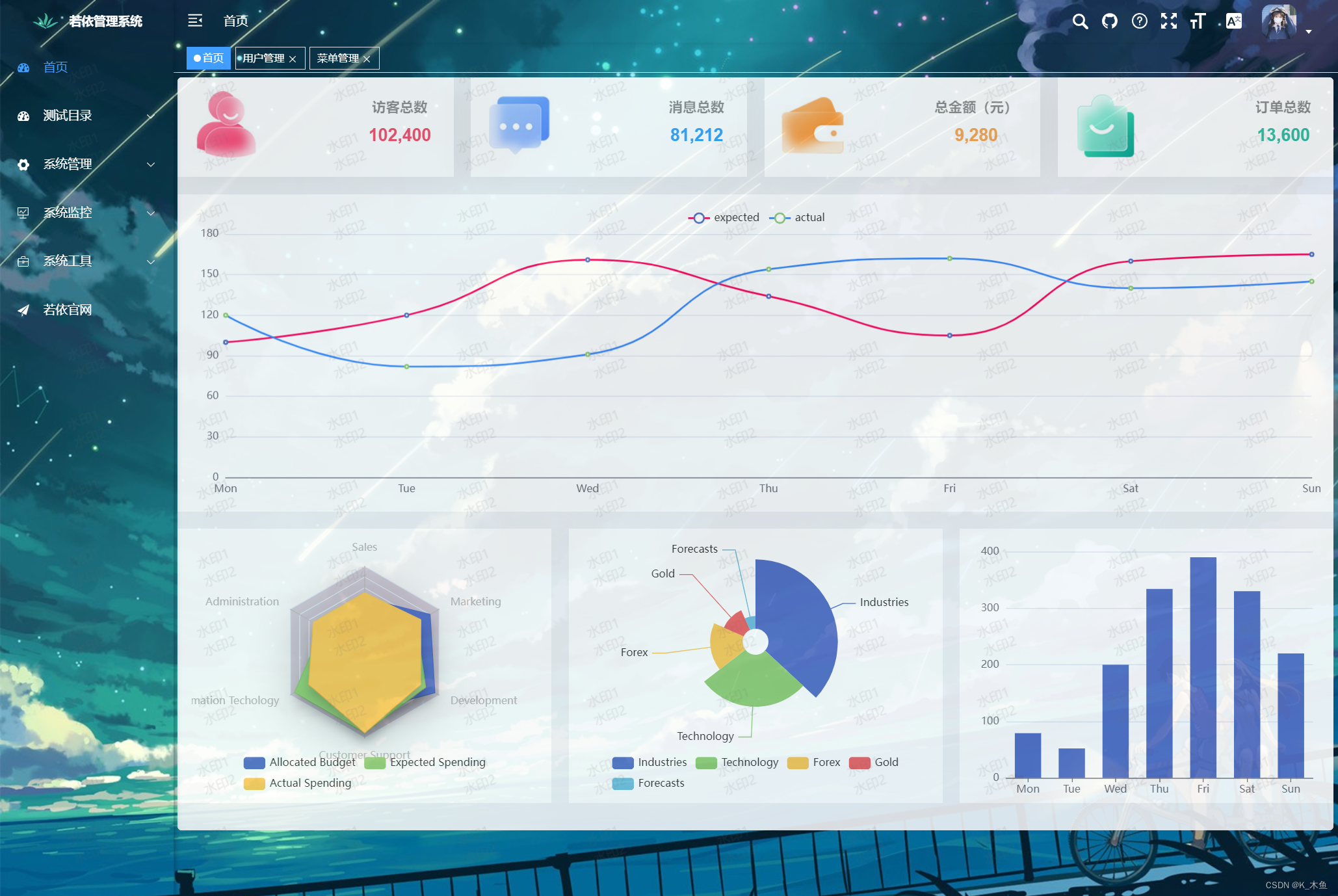
实现步骤
布局设置
找一张图片,放入位置:src/assets/images/theme-bg.jpg
布局组件
文件位置:src/layout/components/Settings/index.vue
为了样式美观,给img标签添加了style属性,svg图标填充颜色设为白色:fill='#ffffff'

炫彩主题需要背景色透明,不能实现固定header
固定 Header核心代码:
页面加载时向body元素中插入一个img元素,切换主题时控制img元素的显示/隐藏。
handleTheme()是主题切换时触发的函数。
import exampleImg from 'https://blog.csdn.net/qq_51532249/article/details/@/assets/images/theme-bg.jpg'
// ...
// 在body下插入一个img元素,作为炫彩主题的背景
const body = document.querySelector('body');
const img = document.createElement('img');
img.setAttribute('src', exampleImg);
img.style.minWidth = '100%';
img.style.minHeight = '100%';
img.style.position = 'fixed';
img.style.left = '0';
img.style.top = '0';
img.style.zIndex = '-1';
// 获取当前主题名称,若当不是炫彩主题,将其隐藏
if (settingsStore.sideTheme !== 'theme-shine') {
  img.style.display = 'none';
}
body.appendChild(img);
function handleTheme(val) {
  // 选中炫彩主题,并且背景图为隐藏状态
  if (val == 'theme-shine' && img.style.display == 'none') {
    img.style.display = 'inline-block';
    // 炫彩主题需要背景色透明,不能实现固定header
    fixedHeader.value = false;
  } else {
    img.style.display = 'none';
  }
  settingsStore.changeSetting({ key: 'sideTheme', value: val })
  sideTheme.value = val;
}
// ...
其他
剩下的修改的地方与上面类似。
下面是炫彩主题特有的:
展示内容的路由出口
文件位置:src/layout/components/AppMain.vue
添加动态style属性
样式修改如下:主要是让.app-main控件看着更舒服
布局设置-开启topNav后,顶部展示的组件
组件位置:src/components/TopNav/index.vue
添加两个动态:background-color属性
(这里改的比较粗糙,用到的时候再详细修改)
更多菜单 打开页面切换的TagesViews
文件位置:src/layout/components/TagsView/index.vue
添加动态style属性。
补充非显示页面的标签样式
// ...
import variables from '@/assets/styles/variables.module.scss'
const settingsStore = useSettingsStore();
const sideTheme = computed(() => settingsStore.sideTheme);
// ...
function activeStyle(tag) {
  if (!isActive(tag)) return {
    'color': sideTheme.value === 'theme-shine' ? variables.navbarShineColor : '',
    'background-color': sideTheme.value === 'theme-shine' ? variables.navbarShineBackground : ''
  };
  return {
    "background-color": theme.value,
    "border-color": theme.value
  };
}
好了,圆满结束。
上一篇:jQuery-选择器

- 关注我们
- 扫描二维码
- 获取更多信息
- 精彩一手掌握
 沪ICP备19022315号


