


- WordPress 告别 MySQL:Docker SQLite Wo
- Django中的实时通信:WebSockets与异步视图的结合
- 1.5MHz,1.2A COT 架构同步降压变换器只要0.16元,型号
- 探索前沿AI技术:什么是LLM框架?什么是Agent应用?什么是Wor
- 华为eNSP配置MSTP实验
- 使用PySpider进行IP代理爬虫的技巧与实践
- 【Nginx】centos和Ubuntu操作系统下载Nginx配置文件
- SpringBoot接口入参校验的几种方式
- 如果项目在上线后才发现Bug怎么办?
- ruoyi-vue(若依前后端分离版本)环境搭建 用idea 安装re
- 【算法专题】FloodFill 算法
- 解决org.apache.tomcat.dbcp.dbcp.SQLNe
- Nginx系列:windows10系统下安装nginx的安装并配置!
- 【云原生系列】云计算概念与架构设计介绍
- Springboot多种方法处理静态资源:设置并访问静态资源目录
- 前后端分离Springboot 整合使用activiti7教程(一)(
- 关于MYSQL的XA事务(分布式事务)的了解以及MySQL5.7.7对
- Python江苏南京二手房源爬虫数据可视化系统设计与实现
- nginx502 Bad Gateway错误解决办法
- 【SQL相关】Hive行列字符串的合并与拆分
- Nginx七层负载均衡
- Django学习(1):Django项目的初步创建与简单配置
- vue前端简单实现无缝循环滚动自动播放,滚动条上下滚动,鼠标悬停,从鼠
- 【大数据实时数据同步】超级详细的生产环境OGG(GoldenGate)
- 揭秘智慧礼品背后的故事
- Hive和MySQL的部署、配置Hive元数据存储到MySQL、Hiv
- 鸿运应用开发学习-发现了一个TextInput组件中使用正则表达式后出
- MySQL三表联合查询语法
- 今日推荐库:@microsoftfetch-event-source
- 牛客周赛 Round 39(A,B,C,D,E,F,G)
SpringBoot 集成 WebSocket,实现后台向前端推送信息
在一次项目开发中,使用到了Netty网络应用框架,以及MQTT进行消息数据的收发,这其中需要后台来将获取到
的消息主动推送给前端,于是就使用到了MQTT,特此记录一下。
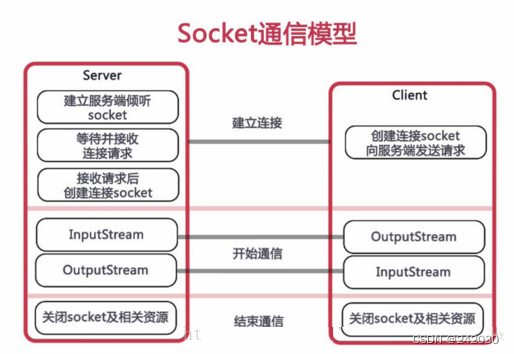
1、什么是websocket?
WebSocket协议是基于TCP的一种新的网络协议。它实现了客户端与服务器全双工通信,学过计算机网络都知道,
既然是全双工,就说明了服务器可以主动发送信息给客户端 。这与我们的推送技术或者是多人在线聊天的功能不
谋而合。
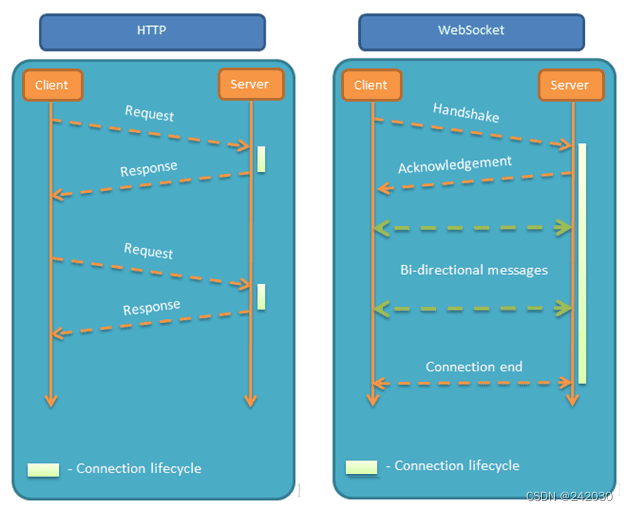
为什么不使用HTTP 协议呢?这是因为HTTP是单工通信,通信只能由客户端发起,客户端请求一下,服务器处理
一下,这就太麻烦了。于是websocket应运而生。
下面我们就直接开始使用Springboot开始整合。以下案例都在我自己的电脑上测试成功,你可以根据自己的功能
进行修改即可。
2、使用步骤
2.1 添加依赖
    4.0.0

        org.springframework.boot
        spring-boot-starter-parent
        2.5.0


    com.example
    springboot-websocket
    0.0.1-SNAPSHOT
    springboot-websocket
    springboot-websocket

        1.8


            org.springframework.boot
            spring-boot-starter


            org.springframework.boot
            spring-boot-starter-test
            test


            org.springframework.boot
            spring-boot-starter-websocket


            org.projectlombok
            lombok
            1.18.10


            org.slf4j
            slf4j-log4j12
            1.7.25


                org.springframework.boot
                spring-boot-maven-plugin
2.2 启用Springboot对WebSocket的支持
package com.example.websocket;
import org.springframework.context.annotation.Bean;
import org.springframework.context.annotation.Configuration;
import org.springframework.web.socket.server.standard.ServerEndpointExporter;
/**
 * @Description: 开启WebSocket支持
 */
@Configuration
public class WebSocketConfig {
    @Bean
    public ServerEndpointExporter serverEndpointExporter() {
        return new ServerEndpointExporter();
    }
}
2.3 核心配置WebSocketServer
因为WebSocket是类似客户端服务端的形式(采用ws协议),那么这里的WebSocketServer其实就相当于一个ws协
议的Controller。
-
@ServerEndpoint 注解是一个类层次的注解,它的功能主要是将目前的类定义成一个websocket服务器端,
注解的值将被用于监听用户连接的终端访问URL地址,客户端可以通过这个URL来连接到WebSocket服务器
端。
-
新建一个ConcurrentHashMap webSocketMap 用于接收当前userId的WebSocket,方便传递之间对userId
进行推送消息。
下面是具体业务代码:
package com.example.websocket; import lombok.extern.slf4j.Slf4j; import org.springframework.stereotype.Component; import org.springframework.stereotype.Service; import javax.websocket.*; import javax.websocket.server.PathParam; import javax.websocket.server.ServerEndpoint; import java.io.IOException; import java.util.concurrent.CopyOnWriteArraySet; /** * @Description: * @ServerEndpoint 注解是一个类层次的注解,它的功能主要是将目前的类定义成一个websocket服务器端, * 注解的值将被用于监听用户连接的终端访问URL地址,客户端可以通过这个URL来连接到WebSocket服务器端 */ @Component @Slf4j @Service @ServerEndpoint("/api/websocket/{sid}") public class WebSocketServer { // 静态变量,用来记录当前在线连接数。应该把它设计成线程安全的。 private static int onlineCount = 0; //concurrent包的线程安全Set,用来存放每个客户端对应的MyWebSocket对象。 private static CopyOnWriteArraySetwebSocketSet = new CopyOnWriteArraySet (); //与某个客户端的连接会话,需要通过它来给客户端发送数据 private Session session; //接收sid private String sid = ""; /** * 连接建立成功调用的方法 */ @OnOpen public void onOpen(Session session, @PathParam("sid") String sid) { this.session = session; //加入set中 webSocketSet.add(this); this.sid = sid; //在线数加1 addOnlineCount(); try { sendMessage("conn_success"); log.info("有新窗口开始监听:" + sid + ",当前在线人数为:" + getOnlineCount()); } catch (IOException e) { log.error("websocket IO Exception"); } } /** * 连接关闭调用的方法 */ @OnClose public void onClose() { //从set中删除 webSocketSet.remove(this); //在线数减1 subOnlineCount(); //断开连接情况下,更新主板占用情况为释放 log.info("释放的sid为:" + sid); //这里写你 释放的时候,要处理的业务 log.info("有一连接关闭!当前在线人数为" + getOnlineCount()); } /** * 收到客户端消息后调用的方法 * * @Param message 客户端发送过来的消息 */ @OnMessage public void onMessage(String message, Session session) { log.info("收到来自窗口" + sid + "的信息:" + message); //群发消息 for (WebSocketServer item : webSocketSet) { try { item.sendMessage(message); } catch (IOException e) { e.printStackTrace(); } } } /** * @Param session * @Param error */ @OnError public void onError(Session session, Throwable error) { log.error("发生错误"); error.printStackTrace(); } /** * 实现服务器主动推送 */ public void sendMessage(String message) throws IOException { this.session.getBasicRemote().sendText(message); } /** * 群发自定义消息 */ public static void sendInfo(String message, @PathParam("sid") String sid) throws IOException { log.info("推送消息到窗口" + sid + ",推送内容:" + message); for (WebSocketServer item : webSocketSet) { try { //这里可以设定只推送给这个sid的,为null则全部推送 if (sid == null) { // item.sendMessage(message); } else if (item.sid.equals(sid)) { item.sendMessage(message); } } catch (IOException e) { continue; } } } public static synchronized int getOnlineCount() { return onlineCount; } public static synchronized void addOnlineCount() { WebSocketServer.onlineCount++; } public static synchronized void subOnlineCount() { WebSocketServer.onlineCount--; } public static CopyOnWriteArraySet getWebSocketSet() { return webSocketSet; } } 配置文件
spring.web.resources.static-locations=classpath:/static
2.4 测试Controller
package com.example.controller;
import org.springframework.stereotype.Controller;
import org.springframework.web.bind.annotation.RequestMapping;
@Controller
public class IndexController {
    @RequestMapping("/index")
    public String index() {
        return "index.html";
    }
}
2.5 启动类
package com.example;
import org.springframework.boot.SpringApplication;
import org.springframework.boot.autoconfigure.SpringBootApplication;
@SpringBootApplication
public class Application {
    public static void main(String[] args) {
        SpringApplication.run(Application.class, args);
    }
}
2.6 测试页面index.html
Java后端WebSocket的Tomcat实现 Welcome
2.7 结果展示
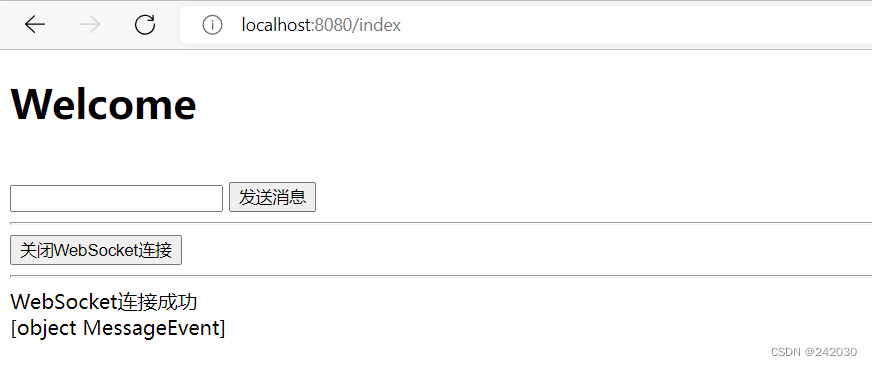
启动浏览器窗口访问:http://localhost:8080/index
后台出现:
2022-08-16 18:18:11.931 INFO 796 --- [nio-8080-exec-3] com.example.websocket.WebSocketServer : 有新窗口开始监听:100,当前在线人数为:1
多次访问:
2022-08-16 18:18:11.931  INFO 796 --- [nio-8080-exec-3] com.example.websocket.WebSocketServer    : 有新窗口开始监听:100,当前在线人数为:1
2022-08-16 18:19:27.054  INFO 796 --- [nio-8080-exec-6] com.example.websocket.WebSocketServer    : 释放的sid为:100
2022-08-16 18:19:27.055  INFO 796 --- [nio-8080-exec-6] com.example.websocket.WebSocketServer    : 有一连接关闭!当前在线人数为0
2022-08-16 18:19:27.107  INFO 796 --- [nio-8080-exec-9] com.example.websocket.WebSocketServer    : 有新窗口开始监听:100,当前在线人数为:1
2022-08-16 18:19:28.332  INFO 796 --- [io-8080-exec-10] com.example.websocket.WebSocketServer    : 释放的sid为:100
2022-08-16 18:19:28.332  INFO 796 --- [io-8080-exec-10] com.example.websocket.WebSocketServer    : 有一连接关闭!当前在线人数为0
2022-08-16 18:19:28.383  INFO 796 --- [nio-8080-exec-3] com.example.websocket.WebSocketServer    : 有新窗口开始监听:100,当前在线人数为:1
2022-08-16 18:19:29.811  INFO 796 --- [nio-8080-exec-4] com.example.websocket.WebSocketServer    : 释放的sid为:100
2022-08-16 18:19:29.811  INFO 796 --- [nio-8080-exec-4] com.example.websocket.WebSocketServer    : 有一连接关闭!当前在线人数为0
2022-08-16 18:19:29.860  INFO 796 --- [nio-8080-exec-7] com.example.websocket.WebSocketServer    : 有新窗口开始监听:100,当前在线人数为:1
前台显示:
发送消息:
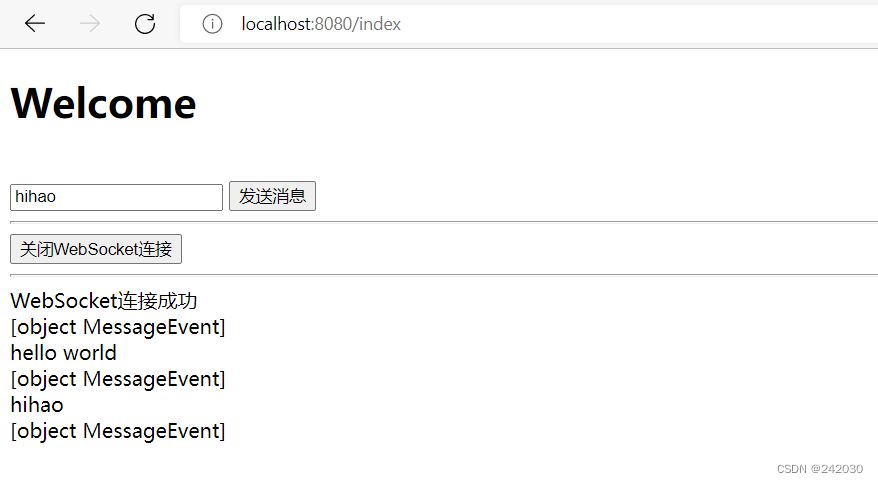
后台显示:
2022-08-16 18:21:58.602  INFO 796 --- [nio-8080-exec-4] com.example.websocket.WebSocketServer    : 收到来自窗口100的信息:{"msg":"hello world"}
2022-08-16 18:22:03.098  INFO 796 --- [nio-8080-exec-5] com.example.websocket.WebSocketServer    : 收到来自窗口100的信息:{"msg":"hihao"}
3、总结
这中间我遇到一个问题,就是说WebSocket启动的时候优先于spring容器,从而导致在WebSocketServer中调用
业务Service会报空指针异常,所以需要在WebSocketServer中将所需要用到的service给静态初始化一下:如下所
示:
@Component
@Slf4j
@Service
@ServerEndpoint("/api/websocket/{sid}")
public class WebSocketServer {
    // 静态初始化用到的Service
    public static IDetRecordService detRecordService;
}
还需要做如下配置:
@Configuration
public class WebSocketConfig {
    @Bean
    public ServerEndpointExporter serverEndpointExporter() {
        return new ServerEndpointExporter();
    }
    @Autowired
    // 提前注入Spring
    private void setRedisService(IDetRecordService iDetRecordService){
        WebSocketServer.detRecordService= iDetRecordService;
    }
}

- 关注我们
- 扫描二维码
- 获取更多信息
- 精彩一手掌握
 沪ICP备19022315号


