


- Django学习(1):Django项目的初步创建与简单配置
- Rust使用calamine读取excel文件,Rust使用rust
- Spingboot3详解(全网最详细,新建springboot项目并详
- Loading class `com.mysql.jdbc.Drive
- LQR算法原理和代码实现
- 查询效率至少提高4倍的MySQL技巧
- 【PyJavaC++三种语言OD2023C卷真题】20天拿下华为OD笔
- XGBOOST算法Python实现(保姆级)
- 基于springboot的养老院管理系统的设计与实现 (含源码+sql
- 已解决com.rabbitmq.client.ShutdownSign
- 避免 MySQL 插入重复数据的 4 种方式
- mysql 事务详解一
- Python Flask-Mail实现邮件发送
- 云计算——ACA学习 阿里云云计算服务概述
- SQL Server数据库以及Management Studio详细安
- Springboot集成 Spring AI ,深度学习下的与时俱进
- Docker 安装 Nginx 部署前端项目
- 【数据结构】【更新中】【python】leetcode刷题记录:热题1
- 【Docker系列】容器访问宿主机的Mysql
- 分布式系统架构中的相关概念
- [ vulhub漏洞复现篇 ] Apache Flink目录遍历(CV
- springboot与tomcat关系
- Llama2模型本地部署(Mac M1 16G)
- 【爬虫实战】python文本分析库——Gensim
- Swift中的条件语句
- Qt5.14.2 深入理解Qt多线程编程,掌握线程池架构实现高效并发
- visual studio配置node.js开发(完整版)
- Kubernetes(K8s)与虚拟GPU(vGPU):实现高效管理和
- 滑动窗口最大值(力扣239)
- 这里有份百度Create大会超长剧透,请查收!
用户应该分为三类:
1、普通用户(user):只允许登录前台小程序端并进行基本的操作、不能进行后台管理系统的任何操作。
2、店铺管理员(admin):允许管理店铺的栏目CRUD操作、商品CRUD操作、评论的查看与删除、查看店铺的销售情况等。
3、超级管理员(super):允许进行店铺管理和用户管理等操作、能查看系统的用户数和店铺数等基本统计。
具体实现
- 创建vue实例的时候将vue-router挂载,但这个时候vue-router挂载一些登录或者不用权限的公用的页面。
- 当用户登录后,获取用户roles,将roles和路由表每个页面的需要的权限作比较,生成最终用户可访问的路由表。
- 调用router.addRoutes(store.getters.addRouters)添加用户可访问的路由。
- 使用vuex管理路由表,根据vuex中可访问的路由渲染侧边栏组件。
代码层面:
1. 普通用户登录拒绝访问后端:
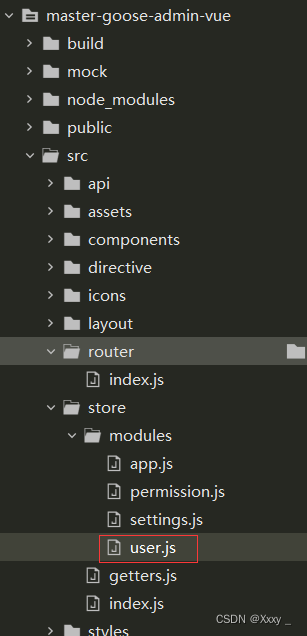
vue前端:
  //用户登录获取token
  login({ commit }, userInfo) {
    const { phone, userPassword } = userInfo
    return new Promise((resolve, reject) => {
      login({ phone: phone.trim(), userPassword: userPassword.trim(),method: 1 }).then(response => {
      //method 为一时代表是登录后台管理系统
        const { data } = response
        commit('SET_TOKEN', data.token)
        setToken(data.token)
        resolve()
      }).catch(error => {
        reject(error)
      })
    })
  },
controller:
  @PostMapping("/login")
    public Result login(@RequestBody User user){
        if(user.getMethod() == 1){ //为后台发出的登录请求,需要检验权限
            String roles = userService.findUserByPhone(user.getPhone()).getRoles();
            if(roles.equals("user")){ //普通用户,阻止登录后台
                return Result.error().message("您没有足够的权限");
            }
        }
     ......省略了其它登录处理代码
2. admin(店铺管理员) 与 super(超级管理员) 不同身份登录能提供不同路由
1.后端返回的用户对象(必须携带roles字段):
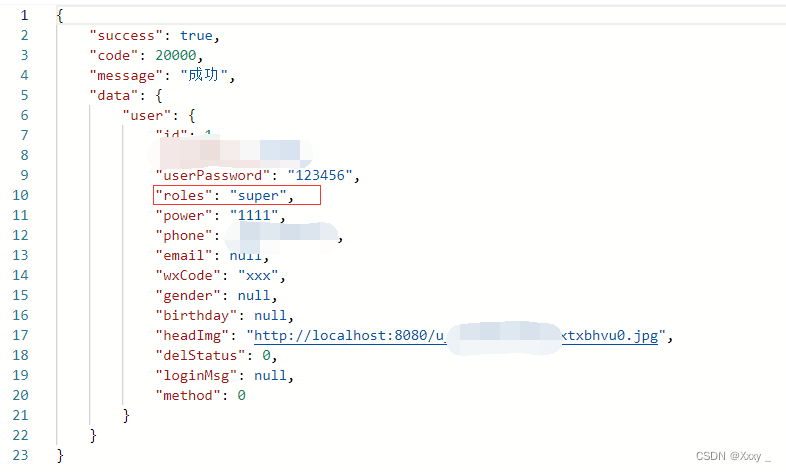
2. vue-element-admin处理:
vue-element-admin登录并改变路由的开始:
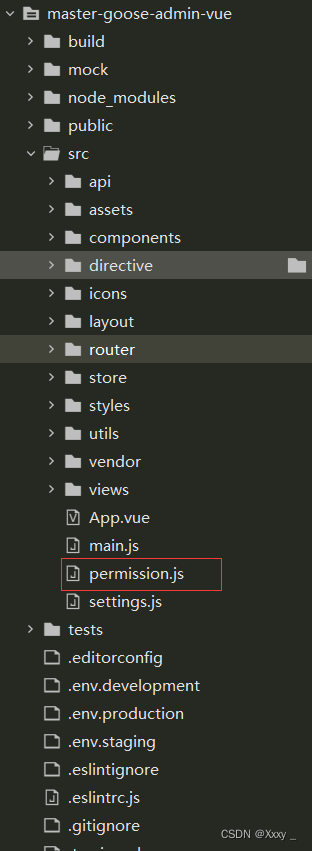
import router from './router'
import store from './store'
import { Message } from 'element-ui'
import NProgress from 'nprogress' // progress bar
import 'nprogress/nprogress.css' // progress bar style
import { getToken } from '@/utils/auth' // get token from cookie
import getPageTitle from '@/utils/get-page-title'
NProgress.configure({ showSpinner: false }) // NProgress Configuration
//白名单
const whiteList = ['/login'] // no redirect whitelist
router.beforeEach(async(to, from, next) => {
  // start progress bar
  NProgress.start()
  // set page title
  document.title = getPageTitle(to.meta.title)
  //获取token
  // determine whether the user has logged in
  const hasToken = getToken()
  if (hasToken) {
    //是否为登录
    if (to.path === '/login') {
      //去首页
      next({ path: '/' })
      NProgress.done()
    } else {
      //从vuex中获取权限
      const hasRoles = store.getters.roles && store.getters.roles.length > 0
      if (hasRoles) { //如果存在则放行
        next()
      } else {
        try {
          //roles 必须是一个数组
          //获取用户信息和权限信息,存到vuex中
          const { roles } = await store.dispatch('user/getInfo')
          //生产路由数据
          const accessRoutes = await store.dispatch('permission/generateRoutes', store.getters.roles)
          //const accessRoutes = []
          // dynamically add accessible routes
          router.addRoutes(accessRoutes)
          var tempRoutes = router.options.routes.slice(0,3).concat(accessRoutes); //将原路由侧边栏显示截取为初始三个(作者其实不支持这样)
          router.options.routes = tempRoutes; //将路由添加到侧边栏(作者其实不支持这样)
          // hack method to ensure that addRoutes is complete
          // set the replace: true, so the navigation will not leave a history record
          next({ ...to, replace: true })
        } catch (error) {
          // remove token and go to login page to re-login
          await store.dispatch('user/resetToken')
          Message.error(error || 'Has Error')
          //next(`/login?redirect=${to.path}`)
          next({ path: '/' })
          NProgress.done()
        }
      }
    }
  } else {
    /* has no token*/
    if (whiteList.indexOf(to.path) !== -1) {
      // in the free login whitelist, go directly
      next()
    } else {
      // other pages that do not have permission to access are redirected to the login page.
      next(`/login?redirect=${to.path}`)
      NProgress.done()
    }
  }
})
router.afterEach(() => {
  // finish progress bar
  NProgress.done()
})
关键的处理函数(getInfo、generateRoutes)在store/文件目录下:
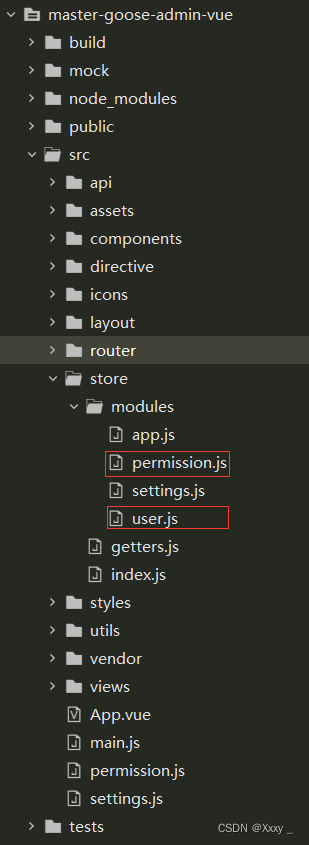
store/modules/permission.js:
const actions = {
  generateRoutes({ commit }, roles) {
    return new Promise(resolve => {
      //存的是有权限的路由,是一个数组
      let accessedRoutes
      if (roles.includes('admin')) {
        accessedRoutes = filterAsyncRoutes(asyncRoutes, roles)
      } else {
        accessedRoutes = filterAsyncRoutes(asyncRoutes, roles)
      }
      //commit('SET_ROUTES', accessedRoutes)
      resolve(accessedRoutes)
    })
  }
}
......部分代码
store/modules/user.js:
  //获取用户信息
  getInfo({ commit, state }) {
    return new Promise((resolve, reject) => {
      //调用api/user里面的接口
      getInfo(state.token).then(response => {
        const { data } = response
        if (!data) {
          return reject('Verification failed, please Login again.')
        }
        const user = data.user
        //console.log(user);
        commit('SET_NAME', user.username)
        commit('SET_AVATAR', user.headImg)
        var temp_roles = [user.roles]; //vue-element-admin里面roles必须为数组
        //console.log(temp_roles);
        commit('SET_ROLES', temp_roles) //设置权限
        resolve(data)
      }).catch(error => {
        reject(error)
      })
    })
  },
......部分代码
router/index.js
import Vue from 'vue' import Router from 'vue-router' Vue.use(Router) /* Layout */ import Layout from '@/layout' /** * Note: sub-menu only appear when route children.length >= 1 * Detail see: https://panjiachen.github.io/vue-element-admin-site/guide/essentials/router-and-nav.html * * hidden: true if set true, item will not show in the sidebar(default is false) * alwaysShow: true if set true, will always show the root menu * if not set alwaysShow, when item has more than one children route, * it will becomes nested mode, otherwise not show the root menu * redirect: noRedirect if set noRedirect will no redirect in the breadcrumb * name:'router-name' the name is used by(must set!!!) * meta : { roles: ['admin','editor'] control the page roles (you can set multiple roles) title: 'title' the name show in sidebar and breadcrumb (recommend set) icon: 'svg-name'/'el-icon-x' the icon show in the sidebar breadcrumb: false if set false, the item will hidden in breadcrumb(default is true) activeMenu: '/example/list' if set path, the sidebar will highlight the path you set } */ /** * constantRoutes * a base page that does not have permission requirements * all roles can be accessed * 不需要权限就可以访问的路由 */ export const constantRoutes = [ { path: '/login', component: () => import('@/views/login/index'), // “@”指的是src目录 hidden: true }, { path: '/404', component: () => import('@/views/404'), hidden: true }, {//侧边栏主页路由 path: '/', component: Layout, redirect: '/dashboard', children: [{ path: 'dashboard', name: 'Dashboard', component: () => import('@/views/dashboard/index'), meta: { title: '主页', icon: 'dashboard' } }], } ] //异步挂载的路由 //动态需要根据权限加载的路由表 export const asyncRoutes = [ {//侧边栏用户管理页路由 path: '/user', component: Layout, redirect: '/user', children: [{ path: 'user', name: 'User', component: () => import('@/views/user/user'), meta: { title: '用户管理', icon: 'user', roles: ['super'] } }] }, {//侧边栏店铺管理页路由 path: '/store', component: Layout, redirect: '/store', children: [{ path: 'store', name: 'Store', component: () => import('@/views/store/store'), meta: { title: '店铺管理', icon: 'shopping', roles: ['super'] } }] }, {//侧边栏发布管理页路由 path: '/commondity', component: Layout, redirect: '/commondity/column', name: 'Commodity', meta: { title: '发布管理', icon: 'edit',roles: ['admin']}, children: [ { path: 'column', name: 'Column', component: () => import('@/views/column/column'), meta: { title: '栏目管理', icon: 'list',roles: ['admin'] } },{ path: 'product', name: 'Product', component: () => import('@/views/product/product'), meta: { title: '商品管理', icon: 'money',roles: ['admin'] } }, ] }, {//侧边栏订单管理页路由 path: '/order', component: Layout, redirect: '/order/order', name: 'Order', meta: { title: '订单管理', icon: 'clipboard',roles: ['admin']}, children: [ { path: 'history_order', name: 'history_Order', component: () => import('@/views/order/order'), meta: { title: '历史订单管理', icon: 'skill',roles: ['admin'] } },{ path: 'receive_order', name: 'Receive_order', component: () => import('@/views/receive_order/receive_order'), meta: { title: '接单管理', icon: 'people',roles: ['admin'] } }, ] }, {//侧边栏评论管理页路由 path: '/comment', component: Layout, redirect: '/comment', children: [{ path: 'comment', name: 'Comment', component: () => import('@/views/comment/comment'), meta: { title: '评论管理', icon: 'message',roles: ['admin'] } }] }, { path: 'external-link', component: Layout, children: [ { path: 'https://gitee.com/x_y_king/master-goose', meta: { title: '项目地址', icon: 'link'} } ] }, { path: '*', redirect: '/404', hidden: true } ]; const createRouter = () => new Router({ // mode: 'history', // require service support scrollBehavior: () => ({ y: 0 }), routes: constantRoutes }) const router = createRouter() // Detail see: https://github.com/vuejs/vue-router/issues/1234#issuecomment-357941465 export function resetRouter() { const newRouter = createRouter() router.matcher = newRouter.matcher // reset router } export default router
3. 可以参考B站视频:
B站—vue-element-admin权限验证流程讲解
vue后台管理不同权限路由实现方式:
通过获取当前用户的权限去比对路由表,生成当前用户具有的权限可访问的路由表,通过 router.addRoutes 动态挂载到 router 上。
权限控制的主体思路,前端会有一份路由表,它表示了每一个路由可访问的权限。当用户登录之后,通过 token 获取用户的 role ,动态根据用户的 role 算出其对应有权限的路由,再通过router.addRoutes动态挂载路由。但这些控制都只是页面级的,说白了前端再怎么做权限控制都不是绝对安全的,后端的权限验证是逃不掉的。现在就是前端来控制页面级的权限,不同权限的用户显示不同的侧边栏和限制其所能进入的页面(也做了少许按钮级别的权限控制),后端则会验证每一个涉及请求的操作,验证其是否有该操作的权限,每一个后台的请求不管是 get 还是 post 都会让前端在请求 header里面携带用户的 token,后端会根据该 token 来验证用户是否有权限执行该操作。若没有权限则抛出一个对应的状态码,前端检测到该状态码,做出相对应的操作。

- 关注我们
- 扫描二维码
- 获取更多信息
- 精彩一手掌握
 沪ICP备19022315号


